Database User Management & Password Configuration in FlyEnv
Managing database users and passwords is a critical part of local development. FlyEnv simplifies this with built-in management tools for all supported databases—no command line required.
Initial Account Passwords
When you first install a database through FlyEnv, default credentials are set for security and convenience:
| Database | Username | Initial Password |
|---|---|---|
| MySQL | root | root |
| MariaDB | root | root |
| PostgreSQL | root | None (no password by default) |
| MongoDB | - | None (no auth by default) |
Important: Change default passwords before exposing databases to the network.
Built-in Database Management Interface (MySQL & MariaDB)
FlyEnv now includes a powerful built-in management interface for MySQL and MariaDB—no external tools needed for common operations.
Accessing the Management Interface
- Open FlyEnv → MySQL or MariaDB module
- Click the "Manage" popover menu
- The management interface loads automatically
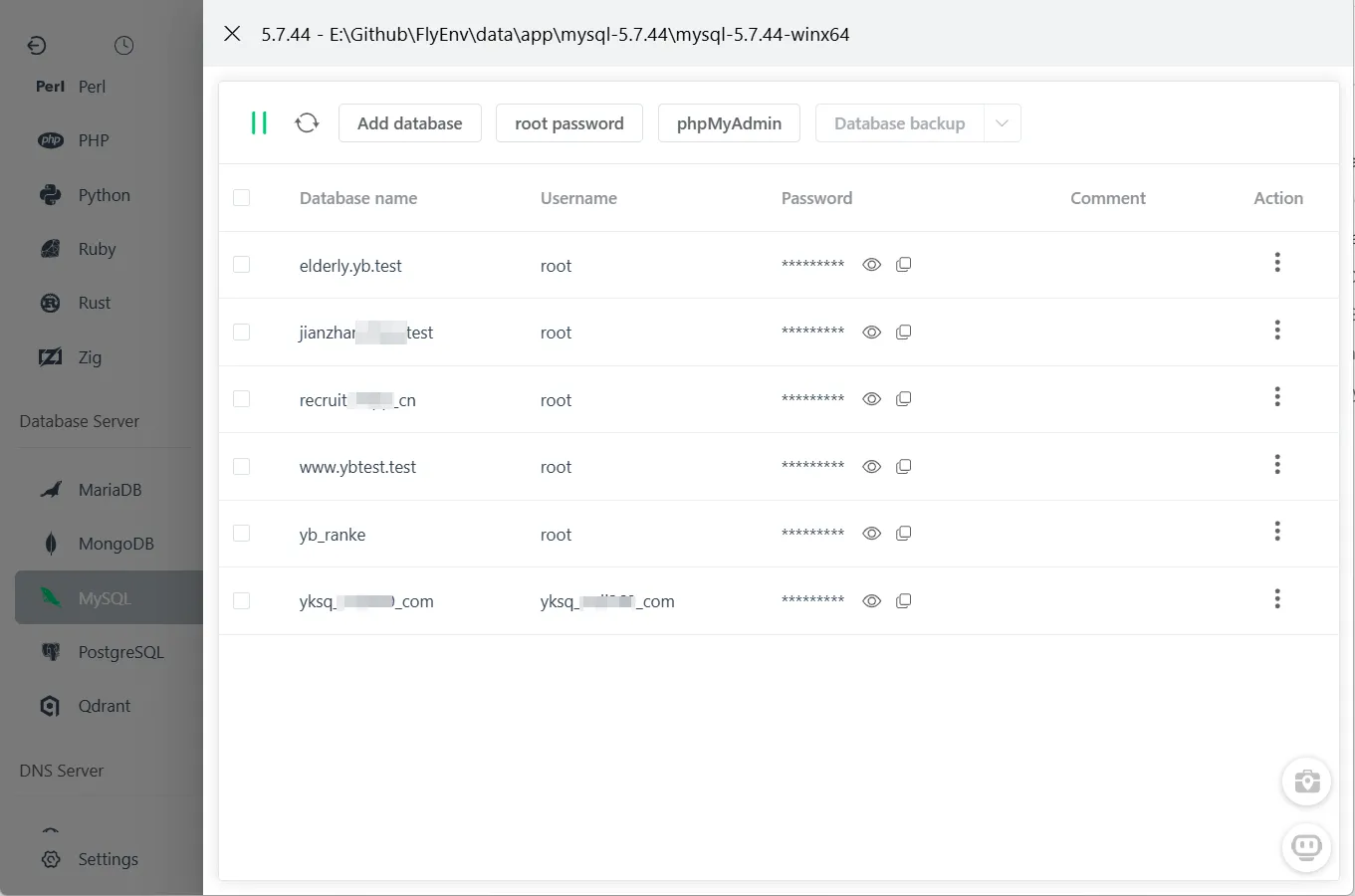
One-Click Database Operations
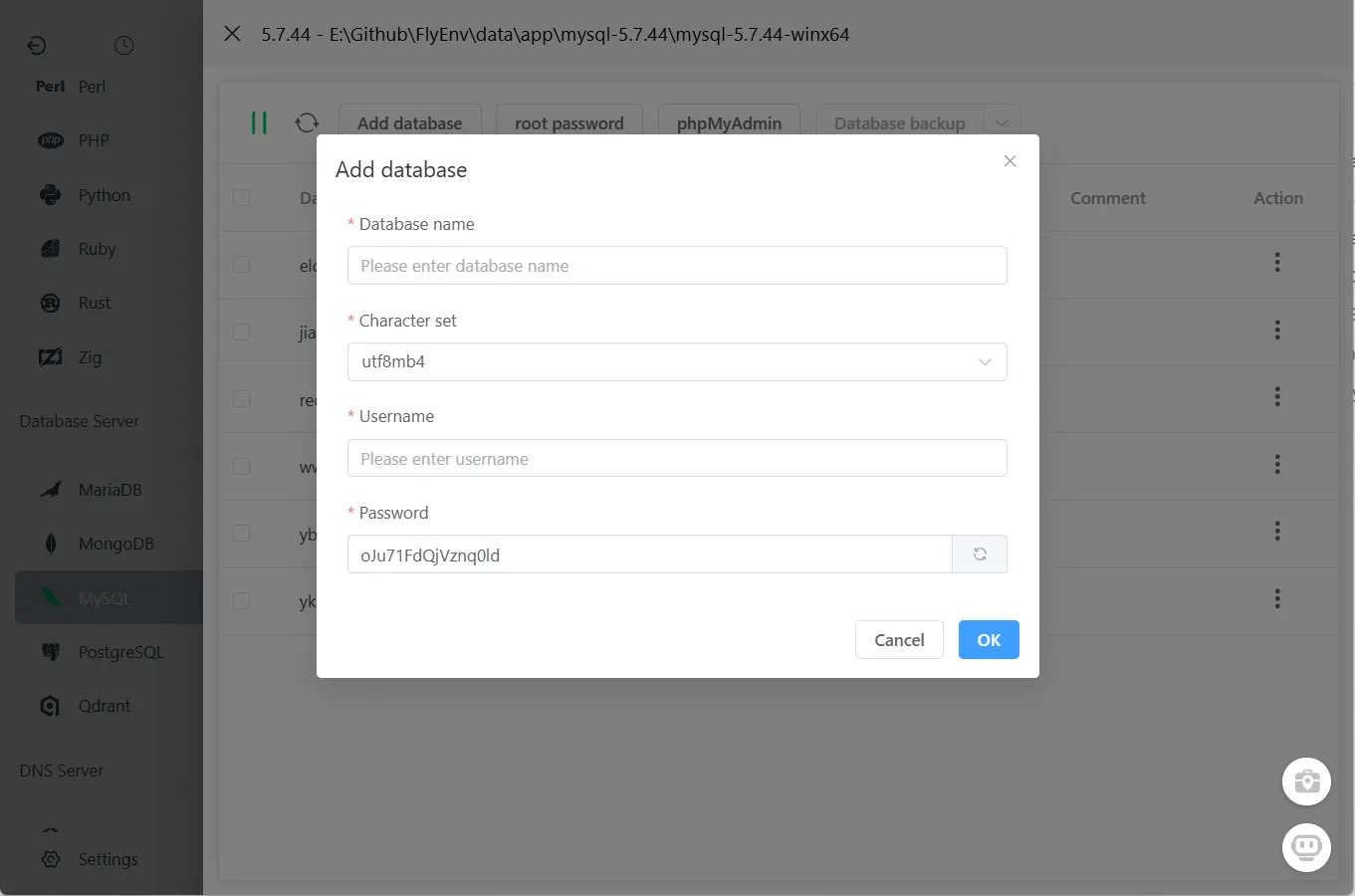
Create New Database
Quickly create databases without writing SQL:
- Click "Create Database" button
- Enter database name
- Enter database username
- Select character set (utf8mb4 recommended)
- Click "Save"
Database created instantly—ready for your application.
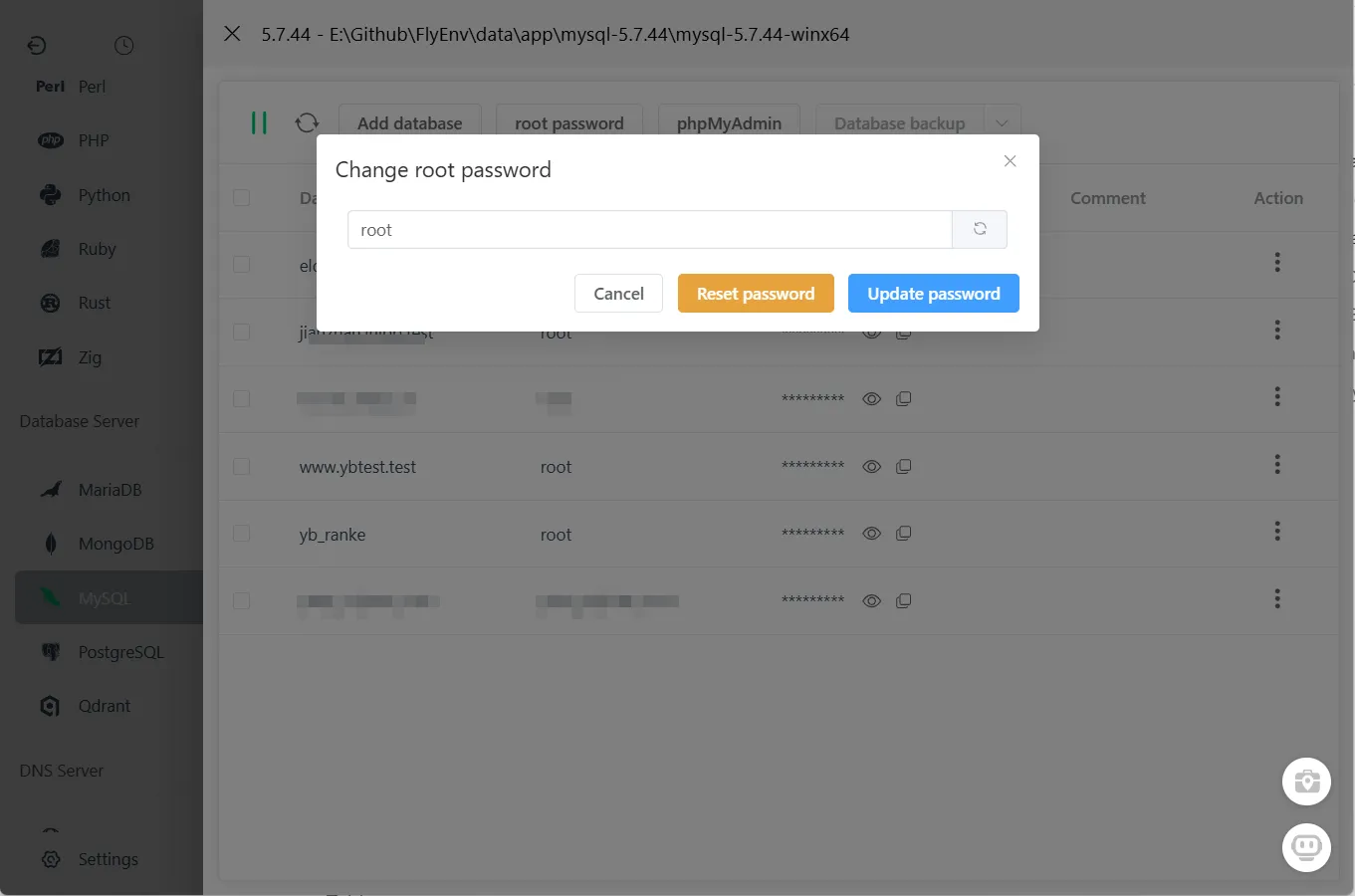
Reset Root Password
Forgot the root password? Reset it with one click:
- Click "Reset Root Password"
- Enter new password
- Confirm password
- Click "Update"
No need to stop the service or edit configuration files manually.
Why Use the Built-in Interface?
| Task | Command Line | FlyEnv Interface |
|---|---|---|
| Create database | Write SQL + execute | 2 clicks |
| Reset root password | Stop service, edit files, restart | 1 click |
| List users | SQL query | Automatic display |
| Change user password | SQL query | 1 click |
Save time: Common operations that used to require multiple commands now take seconds.
External Database Clients
While FlyEnv's built-in interface handles most needs, you may prefer dedicated database clients for complex operations:
Recommended Clients
| Client | Platform | Best For |
|---|---|---|
| phpMyAdmin | Web | Familiar web interface |
| Navicat | Win/Mac | Professional features |
| MySQL Workbench | All | Official MySQL tool |
| DataGrip | All | IDE integration |
| DbGate | Web | Modern web UI |
| DBeaver | All | Free, multi-database |
Connecting to FlyEnv Databases
Use these connection settings with external clients:
Host: 127.0.0.1 (or localhost)
Port: 3306 (MySQL/MariaDB)
      5432 (PostgreSQL)
      27017 (MongoDB)
Username: root (MySQL/MariaDB)
          postgres (PostgreSQL)
Password: [Your configured password]
Security Best Practices
Local Development
- Change default passwords - Don't use "root" or default credentials
- Restrict host access - Use 'localhost' instead of '%' (any host)
- Create app-specific users - Don't use root for applications
- Regular backups - Export databases before major changes
Before Exposing to Network
If you must expose your database to the network:
- Strong passwords - Minimum 16 characters, mixed case, numbers, symbols
- Firewall rules - Restrict to specific IP addresses
- SSL connections - Enable encrypted connections
- Disable root remote access - Create limited-privilege users for remote access
Troubleshooting
"Access denied for user 'root'@'localhost'"
Solution: Use FlyEnv's "Reset Root Password" feature in the Database tab.
"Can't connect to MySQL server"
Check:
- MySQL/MariaDB service is running in FlyEnv
- Correct port (default 3306)
- Firewall not blocking localhost connections
"Unknown database" error
Solution: Create the database first using FlyEnv's built-in interface or your application's migration tool.
Password not working after reset
Solution:
- Ensure MySQL/MariaDB service was running during password reset
- Try restarting the database service
- Check for multiple MySQL installations conflicting
Frequently Asked Questions (FAQ)
Q: Can I use the built-in interface for PostgreSQL or MongoDB? A: Currently, the visual management interface is available for MySQL and MariaDB only. PostgreSQL and MongoDB require external clients or command-line management.
Q: Will resetting the root password affect my existing databases? A: No. Password reset only changes authentication credentials—all your data remains intact.
Q: Can I import existing databases into FlyEnv? A: Yes. Use the external client of your choice to connect to FlyEnv's database and import SQL dumps.
Q: How do I backup my databases? A: Use external clients like DBeaver or command-line tools: mysqldump -u root -p database_name > backup.sql
Q: Can I run multiple database versions simultaneously? A: Yes. FlyEnv supports running different MySQL/MariaDB versions on different ports.
Q: Is the built-in interface secure? A: Yes. It connects through localhost only and respects all MySQL permission systems.
Summary
FlyEnv's built-in database management brings convenience to local development:
- ✅ One-click database creation
- ✅ Visual user management
- ✅ Instant password resets
- ✅ Privilege management without SQL
For most development tasks, you may never need an external database client again.